-(2).png)
How Do I Redeem My Free League Package?
Using the proof email you were sent that provides your athlete's unique voucher code:
- Click the "View your photos" button

- On the photo gallery screen, read the details in the yellow box before moving forward.
- Click on your preferred individual image of your athlete (Do not select the team photo)
- If applicable, select a background
- Click "Shop Products" or "Order Picture"
- On the next page, the Free League Package should be the first option
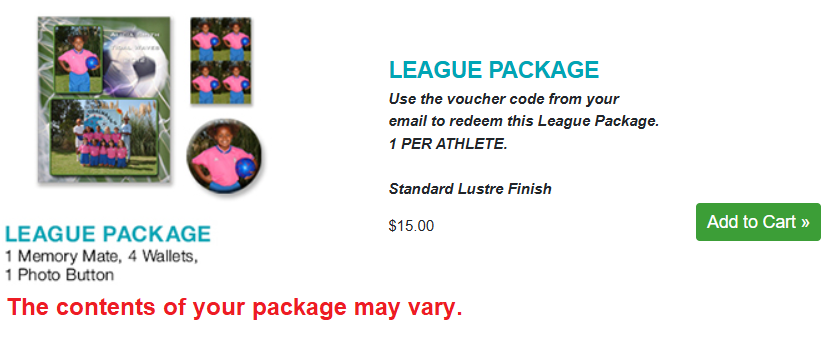
- Click "Add to Cart"
- Preview, then click "Continue"
- When you're ready to checkout, select "Guest Checkout"
- Complete the billing and shipping page
- On the next page, you will enter your voucher code in the Discount box
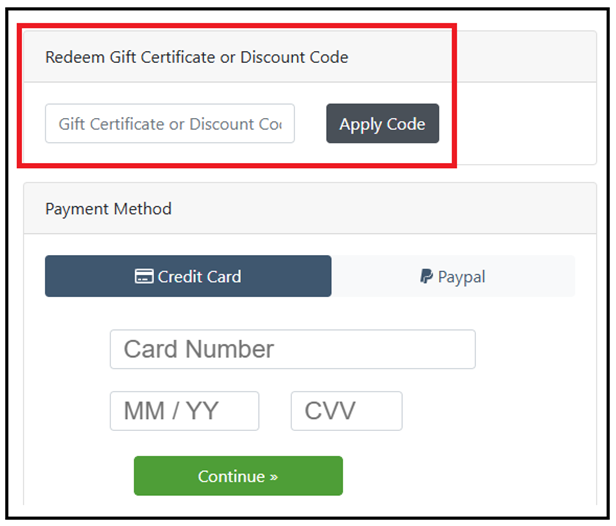
- Click "Apply Code"
- Your balance should now be $0.00, unless you have additional items in your cart.
- Follow the prompts to complete the transaction
You will know your order has been successfully submitted once you see your Order ID number on the screen.
If the league package is not the first option on the products page, it's usually due to one of the following reasons:
- The package has already been redeemed (there's only one per athlete).
- There's no team image currently associated with the athlete's name/PIN.
If the second option is the issue, please contact customer service via chat, email, or phone for additional assistance.