-(2).png)
How to Confirm or Modify an Appointment
*This only applies to appointments originally booked on ultimateexposures.com.
*You can not cancel an appointment online. You must call or email customer service to let us know you won't be able to attend your scheduled session. Please provide your name, name of the event, and your appointment time.
To confirm or modify your session, please follow the instructions below on a desktop or laptop computer. We recommend using Google Chrome or Internet Explorer as your browser.
- Visit our website at www.ultimateexposures.com
- Click “Schedule A Sitting”

- Select the applicable category (ex. Yearbook, Graduation, Athletics, etc.)
- Choose your school or league
- Select the appropriate session type (ex. Senior Portraits, Underclass, etc.)
- Click “Confirm or Modify an Existing Appointment”
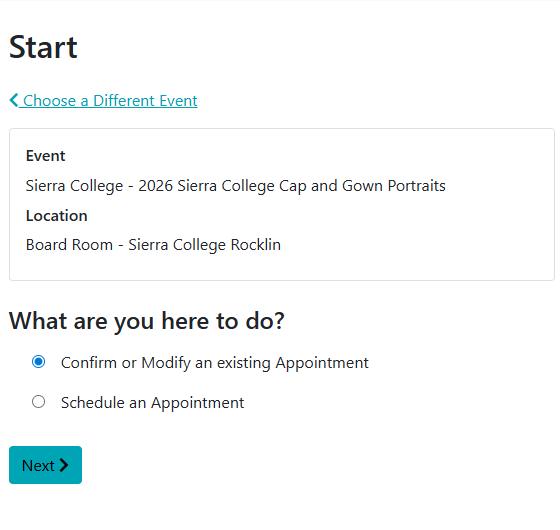
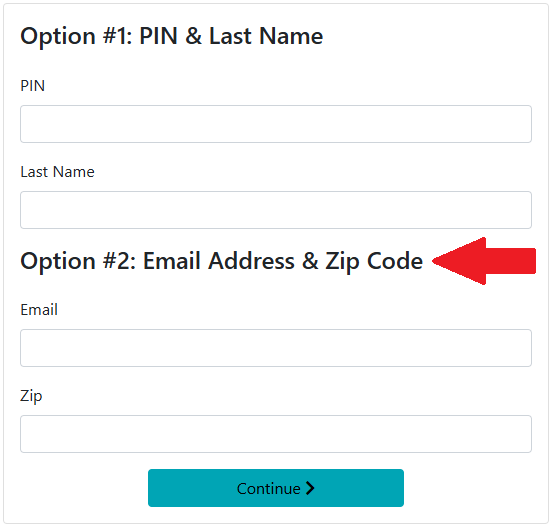
- Enter your email address and zip code under Option #2 (you do not have a PIN yet)
- View your information. If you want to change your session, Click “Choose a Different Time" at the top of the screen and follow the prompts.
If you experience any difficulty while rescheduling, please reply to this email or give us a call at (916) 791-6111 and we’ll be happy to assist you.